Introduction to VOIP
Telephony in the 21st century - Voice Over IP
One of the fastest growing areas of Comms and IT at the moment is VOIP - Voice Over IP - and of course it;s alive with new buzzwords and jargon. You might be forgiven for thinking that there were companies who didn't want you to actually understand it.
Wizards brings you an introduction to the basic concepts of VIOP, and if you're still baffled by anything after reading this, please feel free to call us for a chat.
But whatever you do, DO read this before you buy a new phone system, or even consider upgrading your old one.
If you're just looking for VOIP products, here's our range of VOIP handsets and accessories.
On this page, answers to a number of Frequently Asked Questions. On the next page, our JargonBuster.
What is VOIP and how does it help me?
VOIP stands for Voice Over IP - in a nutshell, encoding your telephone conversation and sending it over the internet, instead of tying up entire phone lines just for one conversation.The most common example of VOIP is Skype. The trouble with Skype is it's tied to your computer and it doesn't scale very well in a commercial environment. True VOIP is designed to work not just on computers, but in real sit-on-your-desk phone sets, and with PBX systems as small as one-line-two-extensions up to multi-line hundreds of extensions.
Wizards can built and install for you today a VOIP based PBX which will look just like an ordinary PBX. It will have
- a box on the wall or in a cabinet
- a connection to one or more BT PSTN or ISDN trunk lines for external "traditional" calls
- a phone on each desk, with normal handset, buttons, possibly headset, or even cordless.
- voice mail
- music on hold
- auto attendant
- call forwarding, hunt groups, etc.
- direct-dial-in numbers to individuals or departments
But will also have the ability to
- make outgoing and answer incoming VOIP calls directly on the internet
- intelligently chose the cheapest outbound route for any given call, inc via internet
- connect your office to one or more ITSPs
- allow home and remote office users to have phones which appear as ordinary extensions on your system
- allow larger remote offices to have similar PBXs, and to route calls transparently between them over the internet
- allow the use of "soft phones" - phone software in a laptop you use with a headset or speakers and mike, no hardware required.
- save on cabling - the phones are connected to your normal data network, no need for separate phone sockets to each desk
So these VOIP systems cost a lot?
Not at all - they tend to be cheaper than legacy digital systems, and cheaper than "VOIP enabled" legacy systems. This is because even if you use only VOIP handsets, a legacy system still has all the hardware to support "ordinary" digital phones as well. A dedicated VOIP only PBX is designed from the ground up to support only modern IP handsets and by simply not having all the old bits and bobs, it's much cheaper to build. So for any given sized system, the PBX is cheaper, the handsets cost about the same - or less - and then you have the potential huge savings on your telecoms bills to consider.How do VOIP systems make my phone bills smaller?
Well, first of all, by routing calls over the internet, you save money on each call. A call to another VOIP user is free. A call to a landline user costs a lot less - typcial prices are 1.5p/minute to a UK landline, 9p/min to a UK mobile, 2p/min to a french landline, etc...On top of this, if you start to route most of your calls over VOIP, and with the above prices why wouldn't you?, then you will find you don't need as many BT "trunks". So you can cancel off some of the BT lines and you stop paying standing charges on them at once. Or, it stops you having to install more trunks (or ISDN channels) so you save on install fees.
But the calls use up internet bandwidth. That's not free.
Indeed it isn't. If you wish to retain reasonable voice quality (you can choose to pack more calls in less bandwidth but it starts to sound nasty!) then you need about 30k of internet bandwidth per concurrent call.For someone making a few voice calls, most people with a sensibly sized broadband connection to their office or home will have enough spare bandwidth for one or two calls at least. And that, in effect, means the calls are truly free. If you start to make heavy use of VOIP, then you may find you need to increase your broadband speed or even add a second broadband line just for voice calls. This is clearly an increase of cost, but it still makes the overall system cheaper than paying the eqivalent standing charge on enough BT lines to be able to make the same number of calls.
On top of this, if you start to route most of your calls over VOIP, and with the above prices why wouldn't you?, then you will find you don't need as many BT "trunks". So you can cancel off some of the BT lines and you stop paying standing charges on them at once. Or, it stops you having to install more trunks (or ISDN channels) so you save on install fees.
So does a VOIP system impact on my internal network?
Normally, not at all. On a smaller network, the additional traffic is not significant. On a larger network, it may be advisable to install network switches which prioritise VOIP traffic over other data. This won't impact your general performance significantly (for example, a 10 millisecond delay in the last few words for a web page, you'll hardly notice, but a 10 millisecond delay in an incoming VOIP packet may mean the call quality breaks up badly!) and the switches also provide the power for the handsets to save you having to provide a mains socket for each phone. Wizards will examine your network as part of our advice and quotation process and advise on any changes that may be required - before you commit to buy!Does it matter what sort of internet connection I have?
Not really. Dial-up isn't good enough, of course but any broadband, cable or leased line service should be ample, provided you have enough spare bandwidth for the calls you intend to make. As with your internal network, in a busier environment it may be advisable to configure your connection so that VOIP traffic is prioritised. But in most cases, your existing equipment can do this. In any event, Wizards will discuss your current internet service provider, routers, firewalls, etc., as part of our advice and quotation process, so you'll have a complete picture before you sign anything.Are VOIP phones difficult to use?
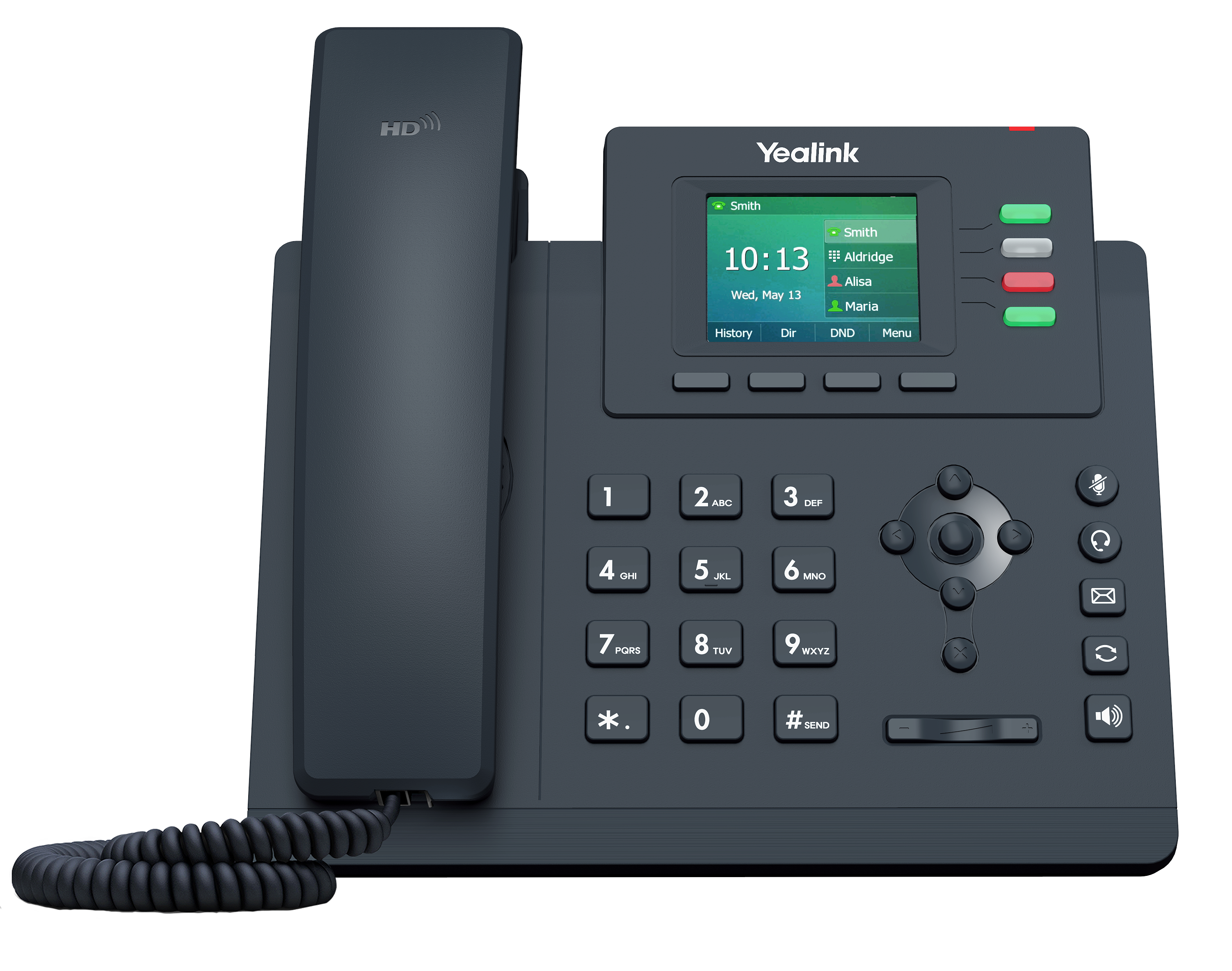
Not at all. They look like ordinary desktop or cordless phones. With speaker-phone, headset, and other similar options you're used to. Here's a picture of the very popular Snom 360
handset. You make calls by picking up the phone and dialling a number, just like a regular phone. The configuration of the PBX decides if the call is made over a regular trunk phone line or goes out via the internet as a VOIP call. Similarly, if you receive an incoming call, be it "normal" or VOIP, the phone rings, the display tells you why, and you pick it up to answer the call. It's easier to configure than a traditional handset too - because you have a WEB control panel to help set up things like speed-dial keys, so you don't have to program then with fiddly strings of numbers and hashes and stars. Wizards will discuss with you what you want the soft-keys on each handset to do, and program them for you during installation. This keeps the "learning curve" for your users to an absolute minimum. We spend more time with "receptionist" users who will handle more calls, queues, forwarding, etc. Receptionsist can also be set up with phones with more soft-keys, configured to show the status of key extensions and groups.